

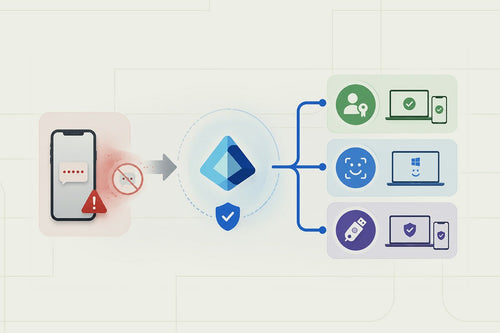
Next year, SMS and voice authentication will no longer be available as a verification method in Entra ID. The migration toward that deadline is already underway: starting September 1, 2026, users still enrolled in SMS or voice MFA can be defaulted into passkey registration. In practice, that gives most organizations about five months of runway before the February 2027 deadline.
That time can erode quickly once you start looking at who still depends on SMS or voice authentication. Users will fall into two distinct buckets. The first are those who will switch to passkeys or Microsoft Authenticator with little trouble. While the other bucket may need a new device, help registering a method, or an exception, while you work through their setup. Before February 2027, IT teams should know how many users fall into each group, ensure the appropriate replacement methods are enabled in Entra ID, and give people enough time to register before SMS and voice are no longer available.
What Is Microsoft Changing With SMS and Voice MFA?
What’s being retired is Microsoft’s own SMS and voice authentication infrastructure in Entra ID, the built-in service that texts or calls a user a one-time code. Microsoft Authenticator isn’t going anywhere. Neither are your existing phishing-resistant methods; if you already have Windows Hello for Business, FIDO2 keys, or Authenticator passkeys deployed, none of that changes.
Passkeys, passwordless credentials bound to a specific device using public-key cryptography, become the default migration path for anyone currently using SMS or voice.
Organizations that have a genuine operational need for telecom-based authentication aren’t left with nothing. Microsoft is adding support for customer-managed telecom providers, so an organization can bring its own SMS/voice vendor into Entra ID instead of relying on Microsoft’s native service. It’s a more deliberate setup than flipping on a built-in feature, and it comes with vendor management that the Microsoft-run service never required.

Why Microsoft Is Moving Away From SMS MFA
The problem with SMS is that the code has to travel through systems outside of Microsoft’s control before it reaches the user. If an attacker can take control of the phone number through a SIM swap, convince a carrier to redirect it, or trick the user into handing over the code, that second factor no longer proves much. Voice authentication has many of the same weaknesses. By comparison, a passkey uses a cryptographic credential that stays with the user’s device and can’t simply be forwarded to an attacker.
Passkeys, Windows Hello for Business, and FIDO2 keys sidestep all of it because there’s no code to steal. The private key never leaves the device, and the authentication request is cryptographically tied to the specific site or app requesting it. Nothing to intercept, nothing to relay, nothing a phishing page can capture and replay.
Microsoft SMS MFA Retirement Timeline
| Date | What IT Teams Should Know |
|---|---|
| September 1, 2026 | Passkey migration begins for users enabled for SMS or voice. This is already happening, not a future milestone. |
| September 18, 2026 | Microsoft is expected to release additional guidance on customer-managed telecom provider options through Microsoft Security Store. |
| October 30, 2026 | Organizations that need to retain telecom-based authentication can begin configuring customer-managed provider options. |
| February 1, 2027 | Microsoft-provided SMS and voice authentication retire. Hard enforcement deadline. |
Microsoft is giving organizations a long enough runway to prepare, which isn’t much once holidays and year-end change freezes are factored in. We saw a similar timeline with Azure MFA Phase 2 enforcement. An organization that waits until January 2027 may have only a few weeks left to identify affected users, test replacement methods, and address registration issues before enforcement begins.
How to Prepare Your Entra ID Tenant for the SMS MFA Retirement
Step 1: Identify Who Is Still Using SMS or Voice MFA
Having Microsoft Authenticator configured does not mean a user has stopped relying on SMS or voice.
Configured methods don’t mean these are the methods users actually have used. A user may have Authenticator registered but still use SMS as their primary or fallback method. Try to find users who would actually be disrupted. The important question is who would lose a usable authentication method if SMS and voice were removed today.
Once a tenant has moved to Conditional Access, older MFA settings can still be used. Identify any legacy uses that persist. From there, identify important or high-risk accounts and prioritize them first. Examples of these include admins, finance users, executives, and anyone with access to sensitive systems, who should be moved away from SMS first.
Take this shared workstations scenario. An employee had registered Microsoft Authenticator months earlier, then never used it again because his actual sign-in routine happened on a device that wasn’t the one he’d registered. If SMS gets shut off and nobody catches that, he’s locked out. This is the kind of thing you find by pulling the logs before you flip the switch, not after.
Step 2: Review Your Entra Authentication Methods Policies
Passkeys are now the default authentication setting, but to enable them for older tenants, the admin can go to the authentication methods section under identity and select Passkey (FIDO2) from the list. It might not be a one-size-fits-all scenario, though. Review users and scenarios together, as one system, rather than flipping each switch independently:
- Entra Authentication Methods Policy
- Legacy per-user MFA settings
- Passkey / FIDO2 configuration
- Microsoft Authenticator settings
- Windows Hello for Business
- Registration campaigns
- Authentication strengths
- Conditional Access policies
Users may already be signing in with Windows Hello, biometrics, or security keys, while SMS is still enabled as a fallback. That usually happens when the newer method gets rolled out, but the older one is never removed from the tenant. The result is that users can still fall back to SMS even though the organization believes it has moved on.
Step 3: Decide Which Authentication Methods Will Replace SMS
Requiring the same authentication method for everyone can quickly create problems. A corporate laptop user may already be set up for Windows Hello, while an employee working from a shared device may need a FIDO2 security key. Account for those differences before deciding which methods will replace SMS across the tenant.
Passkeys work broadly across supported devices and modern browsers, and they’re the default path Microsoft is pushing SMS/voice users toward.
Windows Hello for Business fits managed Windows environments best, since it’s already integrated at the device level and doesn’t require carrying anything extra.
FIDO2 security keys cover what the other two can’t: privileged administrators who need a hardware root of trust, users without smartphones, and high-security environments where biometric or platform-based auth isn’t an option.
Microsoft Authenticator still has a role, but it’s worth separating traditional push notifications and one-time codes from Authenticator-based passkeys. The former beats SMS but still isn’t phishing-resistant. The latter is.
A workable default: passkeys for most users, Windows Hello for Business for managed Windows devices, FIDO2 keys for privileged accounts, and anyone who falls outside the first two.
Step 4: Identify Users Who Cannot Follow the Standard Migration Path
Find these users now, before enforcement, rather than through a wave of help-desk tickets in February 2027. Common groups that need a different plan:
- Frontline workers and shared-device users
- Contractors and other non-employee identities
- BYOD users
- Users without compatible smartphones
- Executives and privileged administrators with unusual device or travel patterns
- Remote workers in regions with platform or device restrictions
- Service or non-human accounts, which can carry policy dependencies that only surface when something breaks
- Users in countries where certain authentication hardware or software isn’t readily available
Each group needs a defined path assigned in advance: a FIDO2 key, a customer-managed telecom provider, or a documented Conditional Access exception. Better to assign that now than discover it at a failed sign-in.
Step 5: Pilot Passkeys Before Broad Deployment
The goal is to have a wide variety of users on multiple devices stress-test a rollout. An employee on a personal Android, someone on a locked-down corporate laptop, and a daily in-house user. Before any of them start, confirm the authentication methods you’re enforcing are enabled and working, not just toggled on somewhere in the admin center.
Separately test operating systems on managed Windows, mobile, and BYOD. BYOD is the most vulnerable and will reveal security gaps. A policy that works fine on a corporate laptop can leave someone stranded on their personal phone at the sign-up screen, and nobody notices until support tickets start piling up.
Check Conditional Access next. Authentication strength requirements especially confirm they’re firing the way you configured them, not the way you assume you configured them.
Step 6: Communicate the Change Before You Enforce It
Communicate more than once. Use an initial announcement, setup instructions, and reminders. Explain what is changing and who is affected. Users should know whether the SMS/voice retirement applies to them. Tell users exactly what they need to do. Specify the replacement authentication method and registration deadline. Provide device-specific setup instructions. Registration may differ depending on the device being used. Give users a clear support path. Make it obvious where they should go if registration or sign-in doesn’t work.
The core idea: give affected users enough information and time to complete registration before SMS and voice stop working.
Don’t rely on one company-wide email. Repetition gives users more opportunities to complete registration before enforcement. The goal is to prevent a February help desk surge. Getting users registered beforehand reduces last-minute problems when SMS and voice stop working.
Can You Opt Out of Microsoft’s Passkey Migration?
Organizations can temporarily opt out of automatic passkey enablement. The opt-out gives IT more preparation time for policy changes, testing, and pilot programs. It does not extend the SMS and voice retirement deadline.
February 1, 2027, remains the cutoff date for SMS and voice authentication. Use the opt-out period to prepare rather than as a way to avoid the migration.

What If Your Organization Still Needs SMS or Voice MFA?
Some organizations may still need SMS or voice authentication for specific users because of accessibility, regulatory, or device limitations. Microsoft is providing an exception path through a customer-managed telecom provider option in Microsoft Security Store.
Pricing and vendor eligibility remain unclear, so organizations shouldn’t build budgets or migration plans around this option until those details are confirmed. Telecom authentication should be treated as an exception, limited to users who genuinely need it. Don’t let the exception delay the broader migration. Most users should still be moved to stronger authentication methods before the deadline.
The strongest takeaway is: SMS and voice may still have a place for specific users, but they shouldn’t remain the tenant-wide fallback.
What Happens If You Do Nothing Before February 1, 2027?
Once SMS and voice no longer satisfy the sign-in flow, an affected user’s next login attempt triggers passkey registration, and for many users, that registration step blocks sign-in entirely until it’s complete, often on a device or in a location that’s not ideal for a first-time setup.
Multiply that across every user who never migrated. What you get is sign-in disruption at scale, a help-desk spike concentrated right around the deadline, policy decisions made under pressure instead of through proper review, and a rough first experience with passwordless authentication for users who could have had months of runway instead. It’s the same pattern that played out during Microsoft’s Azure MFA Phase 2 enforcement for tenants that waited.
How TrustedTech Can Help You Prepare
Not sure how many users still rely on SMS, or whether your Entra environment is actually ready for passkeys? As a Microsoft Solutions Partner, TrustedTech can assess your identity environment and build a migration plan before the February 2027 deadline:
- Assess existing authentication methods across the tenant.
- Identify SMS/voice-dependent users, including legacy per-user MFA configurations.
- Review Authentication Methods policies and Conditional Access.
- Evaluate passkey readiness across managed, BYOD, and shared-device populations.
- Map authentication methods to specific user populations and risk levels.
- Design exception strategies for frontline, contractor, and privileged-user populations.
- Configure and test pilot groups, then plan phased deployment.
- Support end-user migration and communications.
This is the same approach behind TrustedTech’s Microsoft 365 security reviews and its work on MFA cost and ROI: find out what’s actually happening in the tenant before building a plan around what the configuration says on paper.
Prepare your Entra ID tenant before February 2027. Identify authentication gaps, build your migration plan, and move users to phishing-resistant authentication before Microsoft-provided SMS and voice MFA retire.
Key Things to Know About Microsoft SMS & Voice MFA Retirement
Microsoft is retiring its native SMS and voice authentication service.
SMS itself isn’t disappearing. Microsoft is retiring the SMS and voice authentication service built into Entra ID. Organizations that still need telecom-based authentication will have the option to use a customer-managed telecom provider.
February 1, 2027, is the deadline.
Microsoft’s native SMS and voice authentication service is scheduled to stop working on February 1, 2027. The passkey migration period for affected users began September 1, 2026.
Users who haven’t migrated could be stopped at sign-in.
Once Microsoft’s SMS and voice service is retired, affected users will need to register another supported authentication method before they can continue signing in.
Microsoft Authenticator is not being retired.
Authenticator remains supported and can also be used for passkeys. The change applies to Microsoft’s native SMS and voice service, not Microsoft Authenticator.
Passkeys aren’t the only replacement.
Passkeys are Microsoft’s preferred direction. There are other options available, though. Windows Hello for Business works well for managed Windows devices, while FIDO2 security keys can cover privileged users, shared-device scenarios, or people without a compatible smartphone.
SMS can remain an exception after February 2027.
Organizations that genuinely need SMS or voice will be able to use a customer-managed telecom provider through Microsoft Security Store. Microsoft’s own SMS and voice service will no longer provide that authentication path.
Registered methods don’t tell you who still depends on SMS.
A user can have Microsoft Authenticator registered and still use SMS regularly. Authentication Methods usage data and legacy per-user MFA settings can help uncover users who would lose their normal sign-in path when SMS disappears.
Opting out of the passkey rollout doesn’t extend the deadline.
Organizations can temporarily opt out of Microsoft’s automatic passkey enablement. That gives IT more time to test and prepare, but February 1, 2027 remains the cutoff for Microsoft’s native SMS and voice service.
Conditional Access policies need another look.
Older policies may still allow SMS or voice even after stronger authentication methods have been introduced. Review policies that reference authentication methods or authentication strengths so the intended sign-in path still works after the change.
Plan for users who can’t follow the standard migration.
Some employees may not be able to use the authentication method chosen for most of the organization. Decide how those users will authenticate before enforcement, whether that means a FIDO2 security key, another supported method, or a documented exception.
The Bottom Line
The real work starts now, while users are still being nudged toward passkeys rather than being forced. Inventory first, then policy, then pilot, then rollout. Get through those in order, and the deadline is a formality. Skip ahead to February, and it’s a help-desk emergency.
Want to know where your tenant actually stands? Talk to TrustedTech’s identity and security team about an Entra readiness assessment before the deadline arrives.