


The Future of Cloud in 2030
"Gartner reports more than 90% of IT leaders believe AI agents will deliver significant productivity benefits"
Instructor-Led Microsoft Copilot Training
TrustedTech's Microsoft 365 Copilot training is a structured, instructor-led Copilot AI training program, delivered by our architects, that takes users from their first prompt to repeatable workflows in Teams, Outlook, Word, Excel, PowerPoint, SharePoint, and OneDrive.
- 8 training modules across the apps your teams use daily
- 5 engagement steps from kickoff to handover
- 1-2 hour virtual sessions, repeated by cohort
- Full-day in-person workshop with two architects

Copilot Adoption: Why Licenses Go Unused
A license gives someone access. It does not teach them what to ask, where Copilot looks, or how to check what comes back. People try Copilot once with a vague prompt, get a generic answer, and go back to their old habits.
Copilot adoption comes down to habits, and habits come from practice on real work. Our training closes that gap in three ways:
- It teaches prompting inside the apps people already use.
- It builds scenarios from your own reports and templates, so the first win happens on real work.
- It builds a review step into every workflow, so speed never comes at the expense of accuracy.


What a Microsoft Copilot Training Course Looks Like
Our Microsoft Copilot training course is instructor-led and delivered live in short sessions, not self-paced. Here is the agenda from a recent virtual engagement for a fleet management company. Two one-hour sessions, each delivered twice: once to a group of about 10 executives, and once to about 20 knowledge workers. Splitting the cohorts lets each group see Copilot applied to its own work.
Session 1: Copilot for Communication, Meetings, and Office Productivity
- AI prompting best practices
- Copilot in Teams, Outlook, Word, Excel, PowerPoint, and SharePoint
- Open Q&A
Session 2: Copilot for Knowledge, Collaboration, and Agents
- Copilot web app and web chat
- Out-of-the-box agents: what they do and where they fit the business
- Creating agents: a light dive
- Open Q&A
Flexible M365 Copilot Workshop Formats
Choose the format that fits how your teams work. Both are led by TrustedTech architects and built around your real reports.
- Format
- How it runs
- Typical group
- Best for
- Recording
- You provide
Virtual workshops
- Format Focused 1-to-2-hour sessions in Microsoft Teams
- How it runs Repeated across cohorts so every team can attend live
- Typical group Cohorts of roughly 10 to 30, such as executives and knowledge workers separately
- Best for Multiple teams, distributed staff, and role-specific sessions
- Recording Sessions recorded and shared for new hires and anyone who missed one
- You provide Copilot licenses for attendees
In-person workshop
- Format A full-day, on-site workshop led by two TrustedTech architects
- How it runs Fundamentals in the morning, hands-on lab time to follow
- Typical group Around 25 attendees
- Best for One team that wants to build and run scenarios on its own files
- Recording Captured on your room AV and handed to you
- You provide Captured on your room AV and handed to you
Your Copilot Training Toolkit: What You Walk Away With
-

![]()
![]()
On-Demand Learning Hub
A branded Microsoft Learning Pathways site in your SharePoint, with curated Copilot playlists. -

![]()
![]()
Session recordings
Ready to share with new hires or as a reference if anyone misses a session. -

![]()
![]()
Reference guides
Slides and step-by-step workflow documentation for quick refreshers. -

![]()
![]()
Custom agents and prompts
Built and tested around your real reports and templates, ready to reuse every week.


Key Outcomes: Turning Copilot Licenses Into Daily Habits
- Faster time to value Get real value from the licenses you have already purchased, with users who know where Copilot helps and how to prompt it well.
- Confidence across roles Executives and individual departments each get training built for how they work, not a one-size-fits-all demo.
- Repeatable workflows Prepared agents and prompts turn one-off wins into tasks your teams repeat every week.
- Sustained adoption Recordings and reusable agents keep skills growing after the training ends, and the optional learning hub supports continued learning.
- Responsible use Human review is built into every workflow, so users check Copilot's output before it goes out the door.
Copilot Training Prerequisites: Who Provides What
Licenses, access, and sample files from you. Agenda, scenarios, and materials from us.
- Licensing
- Planning
- Custom scenarios
- Training day
What Your Organization Provides
- Licensing Provide Microsoft 365 Copilot licenses for attendees
- Planning Share training goals and priority topics in advance
- Custom scenarios Provide sample reports and templates for custom scenarios
- Training day Provide a Copilot-enabled account for trainers (and a room with AV for on-site sessions)
What TrustedTech Handles
- Licensing Confirm licensing, access, and tenant prerequisites
- Planning Design the agenda and training materials
- Custom scenarios Build and test scenarios before the training
- Training day Deliver training, recordings, and handover materials
Frequently Asked Questions
Copilot Training
What is Microsoft 365 Copilot training?
It is hands-on instruction that teaches employees to use Copilot in the apps they already use, including Teams, Outlook, Word, Excel, PowerPoint, SharePoint, and OneDrive. TrustedTech's version is led by our architects, built around your real reports and templates, and delivered in role-specific cohorts, such as executives and knowledge workers.
Is this a Microsoft Copilot course I can take on my own?
No. It is instructor-led training delivered live by TrustedTech architects, either in virtual sessions or in an on-site workshop. For on-demand learning between sessions, the optional learning hub deploys Microsoft Learning Pathways in your SharePoint tenant.
Is there Microsoft 365 Copilot training for IT teams?
Our sessions are designed for end users and department cohorts, and IT's role is to set up what makes them work: licenses, agent settings, mailbox access, and tenant prerequisites. We walk through that checklist with IT at kickoff.
How long are the sessions?
Virtual sessions run 1 to 2 hours and are repeated across cohorts. The in-person workshop is a full day with two TrustedTech architects: about five hours of instruction plus a 60-minute lunch.
Do you train on our own files and reports?
Yes. For custom scenarios, our architects build prompts and agents from your sample reports and templates, then test each one before training day. In the hands-on lab, attendees run the scenarios on their own files with architects on hand.
Does every attendee need a Copilot license?
Yes, for the hands-on portions. Features such as email and shared mailbox grounding, file knowledge, scheduled prompts, and the Planner Agent require a Microsoft 365 Copilot license. We confirm license assignment at kickoff.
Do you teach Copilot Studio?
No. We teach out-of-the-box agents and those built with Agent Builder in the Microsoft 365 Copilot app. Copilot Studio training and agent development, including agents with direct data-source connections, are scoped separately.
Will Copilot send emails or make changes on its own?
Not in the workflows we teach. Agents produce drafts for review and sending from Outlook. The Planner Agent creates tasks only after the user approves them. We do not include bulk or automated sending in training scenarios.
Can Copilot see files and email that people should not access?
No. Copilot only uses content the signed-in user can already open, so your existing permissions still apply. According to Microsoft, prompts and responses are covered by Microsoft 365 enterprise data protection and are not used to train the underlying models.
Why pay for training when Microsoft offers free learning content?
Microsoft's library is generic. It does not know your reports, your templates, or the weekly tasks your teams repeat. We build scenarios around that work and test them first. If you want Microsoft's library too, the optional learning hub deploys Microsoft Learning Pathways in your SharePoint tenant, including curated Copilot playlists.
What do we keep after the training?
Session recordings, slides, step-by-step reference guides, and the custom agents and prompts built for your scenarios. An on-demand learning hub is available as an optional add-on.
What if Microsoft changes a Copilot feature after training?
Feature availability varies by tenant and changes frequently, so we test every scenario before the training day and inform attendees which features may vary. For ongoing questions, TrustedTech Certified Support Services can help after handover.
How soon can we start?
Kickoff is typically scheduled about four weeks after a signed statement of work. A project manager sets the date one to two weeks in advance.
Our tenant may not be ready. What should we do first?
Start with our Microsoft 365 Copilot Readiness Assessment. It verifies licensing, access, and tenant prerequisites before you invest in training.
Why TrustedTech for Copilot Training
We are a Microsoft Direct Cloud Solution Provider with all six Microsoft Solutions Partner designations. Our ProServices team does not just license Copilot. We help your people put it to work, with architects who build and test the scenarios, deliver the sessions, and stay available through TrustedTech Certified Support Services after handover.
Trusted By






















Put Copilot to Work for Your Team
Hands-on, role-based Microsoft 365 Copilot training, delivered virtually or on-site by TrustedTech architects.
Is Your Tenant Ready for Copilot?
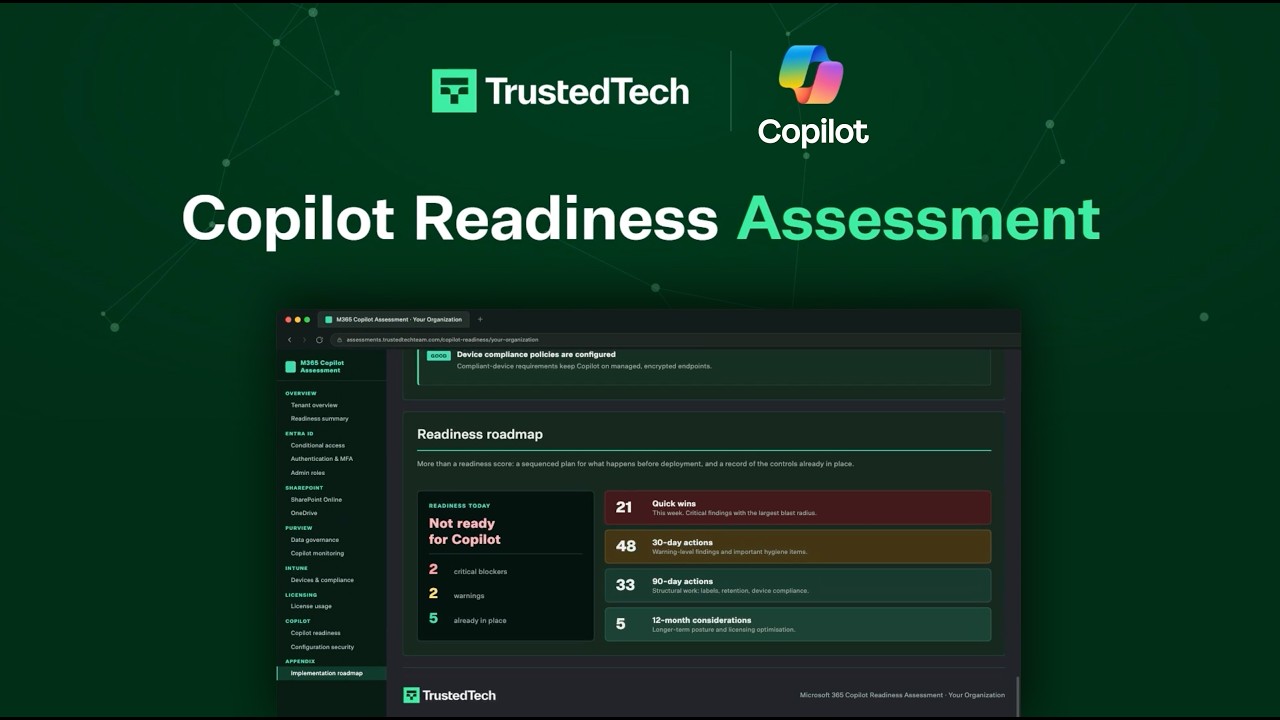
Copilot delivers its value when your Microsoft 365 environment is ready for it. Our Copilot Readiness Assessment shows where your tenant stands today and provides a personalized roadmap in 2 weeks or less.
You’ll get:
- A readiness review of your identity, security, and data
- Clear visibility into data permission and compliance gaps
- An actionable roadmap for a secure Copilot deployment
PROMPTING FRAMEWORK
How We Teach Copilot Prompting
We teach prompting with the four-part framework from Microsoft's Copilot guidance: Goal, Context, Source, and Expectations. State what you want, say who it is for and why, point Copilot at the file or thread to use, and name the format and length you want back.
The difference shows up fast. A weak prompt: "Summarize this report." A strong one: "Summarize this Q3 budget-vs-actual workbook for the CFO's staff meeting, as five bullets, biggest variances first." Same report, same Copilot, a very different result.
Attendees practice on this in every session, using their own work, and follow-up prompts ("shorter," "lead with the risks," "use a table") become habit by the end.
Microsoft 365 Copilot Resources
-

![]()
![]()
Copilot Prompting Guide
Prompts are how you ask Microsoft 365 Copilot to do something for you. TrustedTech can help you accelerate Copilot adoption by providing basic end-user training materials. -

![]()
![]()
Copilot Prompting Do's & Don'ts
Get the most out of Copilot and avoid common pitfalls by learning the do's and dont's for writing prompts. Mastering effective prompt writing ensures more accurate, relevant, and efficient results.