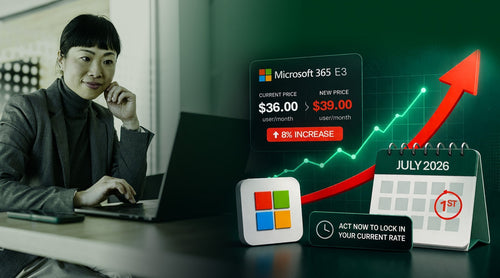
Microsoft 365 licensing is already confusing on a good day, and now there’s another major price increase coming.
In a recent TrustedTech webinar, account managers Andrew Ramos and Lindsay Low broke down what’s changing on July 1, who is impacted, and (most importantly) what organizations can do to avoid paying the higher price at renewal.
5 Key Takeaways: What You Should Do Next
If your Microsoft renewal is after July 1, the key recommendations from TrustedTech are:
- Review what’s changing in your current licenses: You may be getting new bundled features that replace add-ons you’re already paying for.
- Consider a 3-year commitment before July 1: This is the most direct way to avoid the price increase.
- Don’t upgrade blindly: Moving from E3 → E5 only makes sense if you’ll actually use the security/compliance features.
- Explore add-ons as an alternative to full E5: Defender Suite + Purview Suite can be a cost-effective middle ground.
- Plan for adoption after renewal: Licensing value comes from usage, not just entitlements.
Crack the M365 Code How to Increase Savings, Secure More, and Stress Less at Renewal
Here’s the full breakdown, including licensing strategy tips, renewal options, and the most innovative ways to lock in pricing before the deadline.

Why Microsoft 365 Prices Are Increasing (Again)
If your organization has been using Microsoft 365 for the past few years, you’ve probably already felt the shift. This is one of the most significant licensing increases since the major 2022 changes, when Microsoft moved most customers to the New Commerce Experience (NCE).
Since then, Microsoft has added 1,100+ features across the platform, including major updates in:
- Microsoft Defender (security)
- Microsoft Purview (compliance)
- Copilot (AI)
- SharePoint and productivity tools
Microsoft is positioning this increase as more than “just AI.” While Copilot is definitely part of the story, the broader theme is: more bundled security, compliance, and platform features baked into the core suites. Read our full breakdown of new features and capabilities here.
Who’s Impacted by the July 1 Price Increase?
The big headline: almost every core-suite SKU is affected.
This includes:
- Business Basic
- Business Standard
- Office 365 E3 / E1
- Microsoft 365 E3
- Microsoft 365 E5
- Frontline licenses like F1/F3
Even Government and Nonprofit customers are affected, the pricing changes will be applied proportionally based on commercial increases.
The exception?
Two SKUs were called out as not seeing an increase:
- Microsoft 365 Business Premium
- Office 365 E1
That’s… unusually good news in Microsoft licensing world.

What’s Actually Changing in the Licenses?
Microsoft isn’t just raising prices, they’re also bundling more features into core licenses starting July 1.
Here are some of the most significant updates:
1) Office 365 E3 and Microsoft 365 E3: New Security Included
One of the most significant changes is that Defender for Office 365 Plan 1 is being added to certain core suites (including Office 365 E3 and Microsoft 365 E3). That matters because Defender for Office helps with email and collaboration security, and many orgs currently pay for it separately.
2) Business Suite Mailboxes: 100GB Mailbox Size
If you’re using:
- Business Basic
- Business Standard
- Business Premium
Microsoft is increasing the mailbox size to 100GB, meaning the old 50GB cap becomes much less of a headache.
3) Copilot Chat Enhancements Across Core Suites
Microsoft is also rolling out improvements tied to Copilot Chat, including:
- Enhanced Copilot chat experiences
- Adoption and usage analytics
- More reporting visibility
This applies broadly across core suites, including F1/F3 and enterprise tiers.
4) Microsoft 365 E5: Even More Included
For Microsoft 365 E5 customers, the webinar highlighted added inclusions like:
- Microsoft Cloud PKI licensing
- Microsoft Security Copilot elements
- Expanded Intune suite
In other words: Microsoft is leaning hard into bundling security + identity + compliance into E5.

The 3 Microsoft Licensing Tiers That Matter Most
Here is a simple framework that cuts through most of the confusion:
1) Business Premium (Best for under 300 users)
Business Premium includes:
- Full productivity apps
- Defender for Business
- Entra ID P1 (Conditional Access)
- Microsoft Intune
If your organization has fewer than 300 users, this is often the best “secure-by-default” licensing bundle without requiring third-party tools.
2) Microsoft 365 E3 (Best value for many organizations)
M365 E3 includes:
- Enterprise-grade productivity apps
- Baseline security + compliance
- Conditional Access + Intune
- More governance features
- Windows 11 Enterprise
This is where most licenses currently sit, and it is the strongest ROI tier after July 1.
3) Microsoft 365 E5 (The “top of the mountain”)
E5 includes:
- Advanced security analytics
- Defender XDR + Sentinel
- Advanced identity protection
- Full Purview compliance suite
- eDiscovery, audit, insider risk, etc.
It’s positioned as the “barrier” tier: most features, but only worth it if you actually use them.
Why M365 E3 Might Actually Become a Better Deal After July 1
After July 1, Microsoft 365 E3 customers are effectively getting:
- Intune Plan 2
- Intune Remote Help
- Defender for Office 365 Plan 1
- Advanced Analytics
It is estimated that if you bought those add-ons separately today, you’d pay an extra $14.50 per user/month, but Microsoft is only increasing the E3 price by about $3 per user/month.
In plain terms:
Microsoft is raising prices but also bundling more value into E3 than the increase in cost.

A Smart Alternative to Full E5: Defender + Purview Add-Ons
If you’re on Microsoft 365 E3 but don’t want to pay for full E5, Microsoft offers security and compliance add-ons.
These were formerly known as:
- E5 Security
- E5 Compliance
Now they’re more commonly referred to as the:
- Microsoft Defender Suite
- Microsoft Purview Suite
Even more interesting: Microsoft now offers versions of these add-ons specifically designed for Business Premium, letting SMBs build a “mini E5” experience at a significantly lower cost. We compare Business Premium and E3 in depth here.
Renewal Strategy: How to Avoid the July 1 Price Increase
Here are several renewal strategies TrustedTech uses with customers, especially for organizations renewing after July 1.
Strategy #1: Lock in Pricing With a 3-Year Commitment
The simplest way to avoid the price hike is to sign a 3-year commitment before July 1. This locks in the old pricing and helps customers avoid the higher rates for up to 24–30 months, depending on timing.
What Kind Of Microsoft 365 Admin Are You?
Discover where your Microsoft 365 stack is wasting money, adding risk, or creating unnecessary complexity.

Strategy #2: Renew As-Is Now, Then Convert to 3-Year Before July 1
If your renewal is earlier in the year (like February or March) and budget approvals aren’t ready, you can:
- Renew your existing 1-year commitment as-is
- Then later (in May, for example), convert those licenses to a 3-year commitment before July 1
That lets you preserve the ability to renew without disruption, while still giving you a chance to lock in pricing later.
Strategy #3: Align Renewals With Other Tools (Email Security, Phone, etc.)
Licensing strategy shouldn’t happen in a vacuum.
If you’re considering changes like:
- Moving from E3 → E5
- Switching email security vendors
- Replacing a phone system
- Consolidating endpoint security
And then renewal timing matters. A smart licensing strategy often includes aligning renewal dates across tools so you don’t end up paying for duplicate solutions. Read our explainer on how to reduce M365 costs through licensing optimization here.
Promotions: Discounts for Upgrading to E5
Microsoft promotions are currently running through June 30, 2026.
For customers upgrading from E3 → E5:
- 10% savings on a 3-year commitment
- 20% savings on a 1-year commitment
(But you can’t combine both discounts)
The takeaway: if you’re already planning to move to E5, Microsoft is offering incentives to make that jump now.

Important Licensing Rules to Know
The webinar also clarified several key licensing “gotchas” that are easy to miss.
You can upgrade mid-term (usually without penalty)
If Microsoft sees you spending more, they tend to allow it.
Examples:
- Business Premium → E3
- E3 → E5
- 1-year → 3-year
You can’t downgrade mid-term.
Example:
- E5 → E3
Downgrades typically must wait until renewal.
3-year commitment seat counts can’t be reduced
On a 3-year commitment:
- You can keep the exact seat count
- You can increase the number of seats
- But you cannot reduce seats until the end of the 3 years
Billing FAQ: Do 3-Year Plans Require Paying Everything Upfront?
For Microsoft 365 E3 and E5 on a 3-year commitment:
- Billing requires an annual upfront payment
- You can pay all 36 months upfront, but Microsoft doesn’t give an extra incentive to do so
Other add-ons (Visio, Project, etc.) can often remain monthly
Post-Renewal Optimization: The Part Most Teams Skip
Renewing licenses is not the finish line, it’s the starting line.
TrustedTech’s post-renewal focus is on helping customers actually realize the value of what they’re paying for, including:
- Deploying new capabilities
- Driving adoption (end users + admins)
- Measuring usage and security outcomes
- Optimizing and tuning configurations
This is described as a “flywheel” of:
Deployment → Adoption → Measurement → Optimization
Real-World Example: 30% Licensing Savings + 50% Support Cost Reduction
Here's a customer example, TrustedTech helped the organization:
- Save 30% on licenses
- Reduce Microsoft support costs by 50%
- Set up Conditional Access
- Roll out Intune for mobile devices
- Improve operational efficiency for IT admins
The broader message: a licensing strategy can reduce costs and improve the security posture, especially when paired with proper deployment.

Microsoft 365 Cost Optimization
How to Reduce Microsoft 365 Costs by 20% or More
The Complete Playbook for Reducing M365 Spend. Everything IT leaders and procurement teams need to cut Microsoft 365 costs without cutting capability.
- License right-sizing strategies
- SKU comparison and downgrades
- CSP vs. direct pricing analysis
- Governance and audit frameworks
- Copilot and add-on cost controls
- Renewal negotiation tactics